

 8:09 AM
 ijun

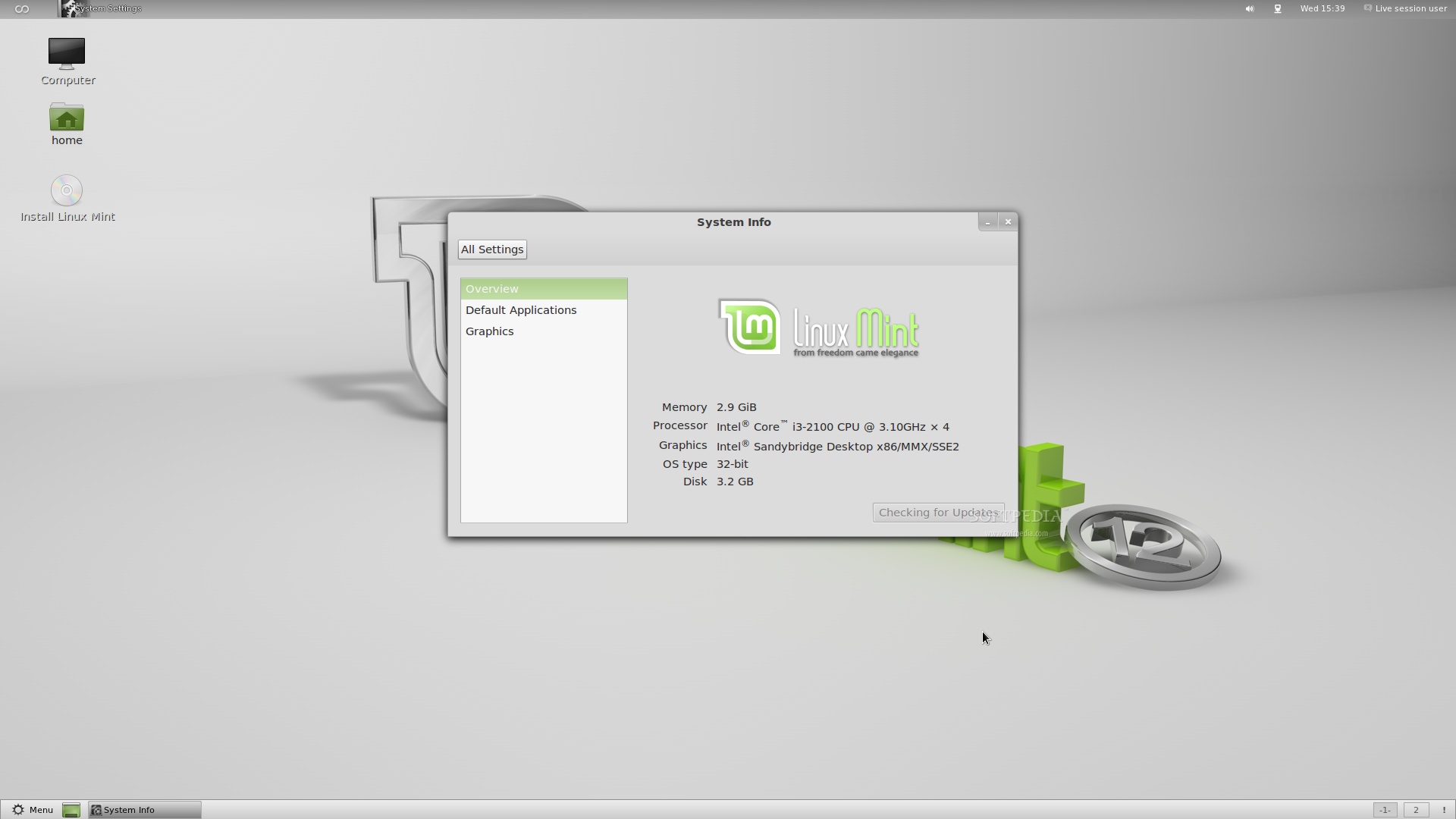
There's no official announcement on the Linux Mint website, yet the ISO images for Linux Mint 12 (Lisa) are aready available on the official Linux Mint mirrors. We've talked to Clement Lefebvre and he told us that these are the final ISO builds of Linux Mint 12. "Yes, but it's not official yet :) Regards, Clement Lefebvre". Linux Mint 12 (Lisa) is based on the recently released Ubuntu 11.10 (Oneiric Ocelot) operating system and is powered by Linux kernel 3.0, X.Org 7.6 and GNOME 3.2. This release of Linux Mint is very special, as it contains a new user interface built on top of the GNOME 3 desktop environment, which gives users a classic two-panel style, making the GNOME 3 migration more enjoyable for everyone. Linux Mint 12 also includes the MATE desktop interface for all GNOME 2 fans, available at the login prompt. Without further ado, will let you review the highlights and screenshots now! Highlights of Linux Mint 12: · Based on Ubuntu 11.10; · Linux kernel 3.0; · No Unity shell; · GNOME 3.2; · MGSE (Mint Gnome Shell Extensions); · MATE interface (fork of GNOME 2); · Mozilla Firefox 7.0; · Mozilla Thunderbird 7.0; · One-click installer for multimedia codecs and extra apps; · New desktop theme, called Mint-Z; · A new set of wallpapers; · LightDM login manager; · LibreOffice 3.4 office suite; · Black screen boot splash; · Lots of bug fixes and improvements.
As usual, Linux Mint 12 (Lisa) is available for both 32-bit and 64-bit architectures, and it is distributed as a Live CD (without multimedia codecs) and Live DVD (with everything included). About Linux Mint Linux Mint is and will always be an elegant, easy-to-use, up-to-date, 100% free and comfortable Linux operating system based on the very popular Ubuntu OS. It offers paid commercial support to companies and individuals. Also, free community support is available from the forums and the IRC channel. Download Linux Mint 12 right now from Softpedia. | |||||||
Showing posts with label free download. Show all posts
Showing posts with label free download. Show all posts
Friday, November 25, 2011
Linux Mint 12 Has Been Released, Download Now



Thursday, April 14, 2011
converter audio vidio "Format Factory"

Format Factory is very easy to use, although it does have rather an unintuitive interface. The file browser doesn't appear until you select the target format, which is a bit weird but as long as you know this first it's no problem. You can select individual files to convert, or complete folders, and also tweak some basic conversion settings.
Format Factory isn't particularly original but what makes it really useful is that it handles images as well as audio and video. Most converters like this only handle audio and video, and adding images to the mix gives it an edge, especially considering it's free. I also like the Audio Joiner in Format Factory, which allows you to take two separate clips, join them together and then convert them. It would have been nice to have had preset profiles for mobile conversions but you can't have it all in a free app sometimes.
Format Factory is an excellent conversion tool for anyone that converts between video, audio and images on a regular basis.
click here to download
new release adobe photoshop cs 5 extended

 Adobe Photoshop is the world’s leader in digital imaging software. It has been the industry standard design application for years, and with each new version it pulls further ahead of its competitors
The new Adobe Photoshop CS5 keeps the same interface design introduced in CS4, with some slight changes. The application shows a minimalist design, with titles reduced to mere lines, nested tool windows and a tabbed working area that makes working with multiple files at the same time a lot easier.
If you’ve already worked with the previous Adobe Photoshop CS4 you won’t have problems in switching to the latest version; if you haven't, you may find this menu arrangement a bit confusing at first.
The major new feature in Adobe Photoshop CS5, however, is an extraordinary set of completely new tools developed to improve the way you work with your images and create more attractive, professional-looking pieces of art.
Among the new features in Adobe Photoshop CS5 we find the content-aware healing brushes, which let you remove any object or detail from an image while magically filling in the space left behind; the smart selection tool, thanks to which selecting difficult elements like hair or tree leaves will be much easier; the so called wet brushes, which behave like real life brushes in terms of paint mixes and and the fun puppet warp tool, with which you can move, stretch or warp selected elements in an image.
As usual, the interface in Adobe Photoshop CS5 is highly flexible, which means you can customize the menus, brushes, patterns, tools presents and almost everything you find on the program. We also recommend getting used to Adobe Photoshop's keyboard shortcuts, as they'll save you loads of time and mouse clicks.
Adobe Photoshop is definitely an application for professionals and as such, has quite a steep learning curve. But this long process of learning does have a reward: the more you practice with all the tools, filters and effects included in Adobe Photoshop, the better results you achieve. Also, there is a huge quantity of web resources, tutorials and manuals all over the internet.
Finally, don't forget that Adobe Photoshop CS5 is a powerful application that can get quite heavy on system resources, especially when you start opening more and more high-resolution documents with multiple layers.
Though probably overwhelming for beginners, Adobe Photoshop CS5 is simply a must-have for anyone with an interest in imaging, particularly professional photographers and designers.
download now by click link below
download
Saturday, March 19, 2011
Potential Energy in a Gravitational Field 1.0

Study potential energy with the help of this simulation.
Potential Energy in a Gravitational Field is a simple, very simple to use application specially designed to help you simulate lifting a block of adjustable mass in different gravitational fields simulating the gravity of the Earth, the Moon, Mars and Jupiter.
This will help you can compare the relationship between the potential energy and the height on these planetary bodies.
Potential energy is stored energy showing various forms of appearance, i.e. gravitational potential energy, elastic, chemical, or electrical potential energy. The energy is stored by doing work against a force such as gravity or the spring in a clockwork motor.

TIPP10 Portable 2.1.0

Touch typing has never been so easy to learn
TIPP10 is a touch styping tutor that features a clear user interface. Beginners will find their way around right away so they can start practicing without a hitch.
You will be able to learn touch typing quickly and efficiently with the program's intelligent training lessons, useful support functions and an extensive progress tracker.
Users will have the possibility to play a dedicated typing game or to improve the functionality of the application with custom lessons.
Here are some key features of "TIPP10 Portable":
Intelligent text selection:
· The lesson texts react instantly to your typing mistakes by repeating mistyped letters more frequently. The system helps you eliminate typing mistakes and learn touch typing efficiently. A wide range of dictations ensures you'll never get bored.
· You will become acquainted with all the keys on the keyboard in 20 sequential training lessons. Commonly used characters are practiced earlier and more frequently than those that appear less frequently.
Ticker and virtual assistance keyboard:
· You can change the font, speed and color of the text in the ticker to ensure a steady typing flow. Keys and motion paths appearing in color on a virtual keyboard help you to use the right fingers and keep the right starting position. A status bar displays the fingers that should be used, your typing errors and characters per minute.
Detailed results:
· After each typing lesson you will receive a printable comprehensive report that evaluates the lesson. A list of all completed lessons including details about duration, number of errors, characters per minute and an evaluation provide you with an overview of the work you have done. A lesson trend diagram shows your progress and allows you to easily compare your results. TIPP10 also shows you your error rate for all the characters and fingers used in the typing lessons. This way you can see right away which keys and which fingers you still need to work on.
Open lessons and using your own texts:
· You can use open lessons or create your own once you've got the hang of touch typing and seek to improve your error rate or speed. There are open lessons with dictations for specialized topics so that you can familiarize yourself with particular styles such as programming or legal texts. You can also load your own texts into TIPP10 and have them dictated to you.
Extensive customization:
· You can choose how the lesson will run. You can set the duration of the lesson, how the typing tutor reacts to typing errors and which visual aids will support you during the lesson. In general settings you can also personalize the software even more. Here, for example, you can select a different speed for the ticker or a larger typeface.
Requirements:
· at least 64 MB RAM
· at least 800 MHz processor
· the graphic card and monitor should support at least 16 million colors (16 bit)
· screen resolution of at least 800x600 pixels
What's New in This Release: [ read full changelog ]
· User interface, lessons and manual in English language
· German training lessons for the NEO 2.0 keyboard layout
· ABC game
· Metronome
· New statistic: Error rates of the fingers
· Color settings for the ticker
· New open lessons
· Revised lessons and improved intelligence


Portable NM Collector JE 2.2.0

A collection managing software
Portable NM Collector JE is an easy-to-use application that was designed in order to provide you with all the necessary tools for managing a database with your collectible items. It comes with a set of built in templates that are ready to use right out of the box.
This is truly portable software designed to be run on any computer with any operating system from a USB Flash drive. Although it can be installed on the computer hard drive it is also designed to run entirely off of a USB flash drive that can be plugged into any computer making it a truly portable application.
Here are some key features of "Portable NM Collector JE":
· Look and Feel - pick and choose your own Fonts including style and size as well as foreground and background colors.
· Field Headings - standard headings available which you can modify and/or make your own.
· Drop Down Values - many provided for each type of collection but you can add and modify your own.
· Collection Type Templates - many are provided and you can create your own.
Limitations:
· 30 days trial
· After 30 days the following features are disabled: Receipt, Disposition, Maintenance, Events, Statistics.

Portable MathProcessor 1.0.2 Alpha

Useful for numerical and mathematical calculations
MathProcessor helps you solve different types of mathematical and statistical problems. It also has some graphing capabilities.
Math Processor uses a simple XML format for testing its operations. The application includes some example files in xml format that can be analyzed.Please have a look at these files, and consider preparing some more test suites for testing the application.
Here are some key features of "Portable MathProcessor":
· Arithmetic
· Statistics
· Plotting
Requirements:
· .NET Framework 3.5 or later
What's New in This Release: [ read full changelog ]
· An edit menu containing very important cut, copy and paste menus. You can now input command data from clipboard. Also you can copy results to clipboard for using inside other applications.
· sort() and sortd() functions for sorting
· pnr() function for calculating permutations
· cnr() function for calculating combinations
· Updated help file
· A couple of bug-fixes
 download now
Math Processor uses a simple XML format for testing its operations. The application includes some example files in xml format that can be analyzed.Please have a look at these files, and consider preparing some more test suites for testing the application.
Here are some key features of "Portable MathProcessor":
· Arithmetic
· Statistics
· Plotting
Requirements:
· .NET Framework 3.5 or later
What's New in This Release: [ read full changelog ]
· An edit menu containing very important cut, copy and paste menus. You can now input command data from clipboard. Also you can copy results to clipboard for using inside other applications.
· sort() and sortd() functions for sorting
· pnr() function for calculating permutations
· cnr() function for calculating combinations
· Updated help file
· A couple of bug-fixes

Virtual Folder 3.1.0.0

his is a simple file management utility
Virtual folder is a tool software to manage you files by virtual folders.The virtual folder is called node in this software. It is a container loading image of a file or folder.
Virtual folder is unlike real folders that contain real files, it contains the file's image like shortcut. In the software you can load your files or folders into a node like a real folder, open a node later, copy and export the inside files or folders into a flash disk or any certain path.
Give Virtual Folder a try to see how useful it can actually be for you!

Saturday, March 12, 2011
kalkulator portable " Portable Kalkules 1.6.0.8"

This tool is a very useful scientific calculator designed with an amount of nontraditional functions. It also offers a wide range of tools, which make your calculations easier and faster. download now
