Tuesday, September 28, 2010

Tinggal 10 hari lagi, Ubuntu LTS edition 10.04 akan dirilis (gak sabar rasanya). Ubuntu yang diberi nama Lucy alias Lucid Lynx ini bakalan menggebrak dari versi versi yang sebelumnya. Contoh, logo seperti yang bisa diliat di samping itu. Itu merupakan logo yang bakal dipakai untuk Ubuntu kedepannya. Menggantikan logo sebelumnya yang memang sudah banyak tahun di gunakan. Jadi lebih awesome euy :D Apa lagi gebrakan yang ditawarkan oleh sistem operasi yang dirilis akhir bulan ini?Nah,,, logo diatas saya comot dari https://wiki.ubuntu.com/Brand. Di sana selain dari logo ubuntu orange itu, ada juga loga ubuntu yang lain (saudaranya). Ada juga screenshoot Ubuntu 10.04 yang bikin kagak nahan. Tidaaaaaaaaaakkk... it's wonderful! :D

Selain mengusung logo baru, seperti pedoman Ubuntu, bahwa setiap versi akan mengusung fitur baru, maka Lucy ini membawa fitur baru, seperti :

  1. GNOME
    Ubuntu 10.04 menggunakan versi GNOME terakhir, dengan beberapa fitur baru yang sepp.
  2. Linux kernel 2.6.32
    Ubuntu 10.04 membawa versi kernel 2.6.32-16.25 berdasarkan 2.6.32.9. 
  3. KDE 4,4 SC 
    bagi Kubuntu (Ubuntu dengan KDE-desktop)
  4. New default open source driver for nVidia hardware 
  5. Peningkatan dukungan untuk proprietary nVidia driver grafis
    NVIDIA driver proprietary saat ini tersedia : nvidia-saat ini (190,53), nvidia-173, dan nvidia-96. Berkat sistem alternatif baru, sekarang dimungkinkan untuk menginstal ketiga paket tersebut pada waktu yang sama (meskipun hanya dapat memiliki satu dikonfigurasi untuk digunakan pada satu waktu).
  6. Social from the Start
    Mempunyai fitur untuk tetap terkoneksi ke situs jejaring sosial seperti facebook, twitter dan lainnya.
  7. New boot experience
    Proses booting yang super cepat ^^
  8. New Indicators
    Area-peringatan yang baru - new area notification. 
  9. New Themes
    Banyak pilihan theme yang yahud :D
  10. Ubuntu One File Syncing
    Ada penambahan fitur dari versi sebelumnya
  11. Ubuntu One Music Store
    Bakal mirip seperti iTunes kayaknya
  12. New features for Ubuntu Enterprise Cloud (UEC)
    -kurang begitu tahu ini tuh untuk apa /**semacam installer**/- 
 Pengen segera akhir bulan :D Selain gajian juga instal Ubuntu dengan versi yang baru :D

Saturday, September 25, 2010

49 Hot New Open Source Applications

What's new in the open source world? We've put together a list of software that was first released (or first made open source) in the last couple of years. While many of these apps are still early in the development process, they're all usable, and in fact, have all acquired fairly substantial user bases in a short time.
What do they have in common? While the apps on our list cover a gamut of categories, we did uncover a few trends.
First, a number of the most successful new open source projects relate to mobility. Several can be used on a USB thumb drive (Appetizer, WinPenPack, UNetbootin), and several others were specifically developed for netbooks (Easy Peasy, eeebuntu, Moblin). Other applications make it easier to use mobile devices like iPods (SyncDocs, MP4 Creator, Streamy).
Second, quite a few of the applications on the list appeal primarily to enterprise users. For example, Turnkey Linux offers open source virtual appliances that are primarily of interest to large organizations. And ProcessMaker, AJAX Chat, and LogicalDOC, also focus on the enterprise market.
Third, multimedia continues to be a hot topic. Songbird, cPlay, Kaltura, Elltube, and others aim to help users do more with their audio and video files.
Finally – and we're not sure if this is significant or not – we found two applications designed to make users smarter: gBrainy and Brain Workshop. Could it be that the open source community is getting older and worrying about short-term memory loss (gasp!)?
Without further ado, here's our list of hot, new open source applications.


Appliances

1. Turnkey Linux
Turnkey offers a variety of virtual appliances pre-configured for tasks like Web development, content management, messaging, and database management. It makes it possible to deploy some of the best server-based open-source applications in just minutes. Available appliances include the LAMP stack (Linux, Apache, MySQL, and PHP), Joomla, Drupal, MediaWiki, Apache Tomcat, and many others. Operating System: Linux.

Audio Tools

2. Songbird
The open source answer to iTunes, Songbird is a music player, store, organizer, and more. One of its best features, mashTape, displays Flickr photos, YouTube videos, biographies, and news articles related to the artist currently playing. Operating System: Windows, Linux, OS X.
3. cPlay
This audio player offers outstanding sound quality with a minimalist interface. The Web site also includes extensive information on factors that affect audio playback. Operating System: Windows.
4. MP3 Diags
Have some of your MP3 files become corrupted? MP3 Diags lets you fix many of the most common problems and make other changes. Operating System: Windows.
5. Virtual MIDI Piano Keyboard
Use your computer's keyboard or mouse to play a tune. Note that you will need some additional software and/or hardware in order to get the application to work. Operating System: Windows, Linux, OS X.

Browser

6. Chrome
No doubt about it, the launch of Google's browser was one of the biggest open source releases of the last couple of years. And while it has a long way to go to match the user base of Explorer and Firefox, its speed and simplicity appeal to an ever-growing number of users. Operating System: Windows, Linux, OS X.

Business Process Management

7. ProcessMaker
ProcessMaker helps enterprises simplify their workflows, eliminate paperwork, and become more efficient. In addition to the free, open-source version, it's also available with paid support or as a hosted application. Operating System: Windows, Linux.

Desktop Enhancements

8. Appetizer
Appetizer launches applications and opens folders from a Mac-like dock instead of the Windows Start menu. It can also be used with applications stored on USB thumb drives and even includes built-in support for Portable Apps.com. Operating System: Windows.
9. Circle Dock
Launch your programs from a circular dock with great background graphics. It's still in the early stages of development, but worth a look. Operating System: Windows.

Developer Tools

10. Evolutility
Build your own database-based Web applications without writing any code manually. It's easy to integrate into existing Web sites, offers a lightweight footprint, and supports all the major browsers. Operating System: Windows.
11. AJAX Chat
This Web chat software features multiple channels, private channels, private messaging, invitation system, controls for offensive users, custom emoticons, and more. It also integrates easily with popular forum software like phpBB, myBB, etc. Operating System: OS Independent.

Next Page: more new open source apps
12. Samurai Want to see how well your Web applications would stand up to an attack? Samurai collects some of the best open-source testing tools available in a single package. Operating System: Linux.

Document Management

13. LogicalDOC
LogicalDOC makes it quick and easy to set up a Web-based document archive so that you can store, search, and organize your files. Features include scanner support, document signature, version control, and more. Operating System: OS Independent.

eBook Organizer

14. eLibrary


This app makes it easy to organize, tag, and search your eBook collection. Input book information manually, or it can automatically find cover art and other info for you. Operating System: Windows.

e-Commerce

15. PrestaShop
With more than 30,000 active community members, PrestaShop has quickly developed quite a following. Key features include scalability, an intuitive interface, and lightweight size (around 6 MB). Operating System: Windows, Linux, OS X.
16. Open Auto Classifieds
Designed just for car dealers, this application makes it easy for the non-technically inclined to set up an online vehicle listing with minimal expense. Operating System: Windows, Linux, OS X.

Games

17. Rigs of Rods (RoR)
This truck, car, airplane, and boat simulator uses a unique soft-body physics engine, which makes the simulated vehicles more flexible and lifelike. Create your own vehicle or drive one of the more than 2000 vehicles that other users have already designed. Operating System: Windows, Linux.
18. Solitaire Greatest Hits
Free solitaire card games for the Mac. It includes Klondike, Free Cell, Spider, Pyramid, Canfield, Aces Up, Golf, Scorpion, Yukon, Baker's Game, or Forty Thieves. Operating System: OS X.
19. gbrainy
This app aims to keep your mind sharp, no matter what your age. It includes logic puzzles, mental calculation, memory trainers, and verbal analogies. Note that while there is a Windows version, gbrainy was developed for GNOME and works best for Linux users. Operating System: Windows, Linux.
20. Brain Workshop
Brain Workshop uses the Dual N-Back mental exercise to help you improve your short-term memory and fluid intelligence. It may help you overcome some of the effects of aging or ADD, but mostly, it's fun. Operating System: Windows, Linux.
21. Open Sonic
Yes, there's now an open-source version of Sonic the hedgehog. While it is different from the other Sonic games, it should be familiar. Unfortunately, the alpha release has only two levels so far, and the OS X version isn't very polished. Operating System: Windows, Linux, OS X.

Mind Mapping

22. XMind
Winner of multiple awards, XMind is a brainstorming and mind mapping application that is similar to (and compatible with) FreeMind. Originally released under a commercial license, it went open-source about a year ago. The latest release includes Web 2.0 and Gantt project tracking features. Operating System: Windows, Linux, OS X.

Mobile Applications

23. winPenPack
This app lets you take your favorite open-source apps with you wherever you go on a USB thumb drive. It's similar to the better known PortableApps.com, but it includes a lot more software. It comes in six different flavors: 2Gb, Essential, Game, School, Web, and Personal. Operating System: Windows.

Multimedia Tools

24. MP4Creator
Part of Cisco's mpeg4ip suite, MP4Creator lets you create and modify MP4 files. With it you can turn existing audio and video files into streams that can be understood by most devices, including PCs, iPods, iPhones, and others. Operating System: Windows.
25. Streamy
This media recorder allows you to watch (or listen to) streaming video or audio, download files, and drag and drop files to play on your computer or iPod. The handy bookmark manager makes it possible to keep track of your favorite sites. Operating System: Windows, Linux, OS X.

Novel Writing

26. Storybook
Although it's designed primarily for novelists, Storybook helps creative writers of all kinds keep track of characters, locations, and multiple plot lines. Track plot lines chronologically, organize chapters and scenes, type your manuscript, and more. Operating System: OS Independent.

Operating System

27. Easy Peasy
Don't like the operating system that shipped with your netbook? Try Easy Peasy instead. It's based on Ubuntu and is optimized for use on the Asus eee. Operating System: Linux.
28. eeebuntu
As you can probably tell from the name, eeebuntu is another Ubuntu-based operating system for the eee netbook. It includes a variety of popular open-source applications, like Firefox, OpenOffice.org, Pidgin, Thunderbird, VLC, Banshee, and more. Operating System: Linux.
29. andLinux
Want to give Linux a try without giving up your Windows machine? Or do you want to use an app that only works in Linux? andLinux lets Windows users take the Ubuntu desktop for a spin and run most Linux applications. Operating System: Windows.
30. Portable Ubuntu Remix
Similar to andLinux, Portable Ubuntu Remix lets you run Linux apps in Windows. It's not quite as polished as andLinux, but some people prefer it. Operating System: Windows.
31. Moblin
Now managed by the Linux Foundation, Moblin was originally developed by Intel as a Linux-based operating system for netbooks and other mobile devices. Specifically, it was designed to run (and sell) the Intel Atom processors released in April 2008. Operating System: Linux.
32. Tiny Core Linux
The name says it all – Tiny Core Linux squeezes a desktop Linux into just 10MB. To really use the OS, though, you'll probably have to add extensions, but the app gives you complete control over which extensions you add. You end up with a lightweight, customized Linux distribution. Operating System: Linux.
33. UNetbootin
UNetbootin lets you turn a USB thumb drive into a bootable Linux drive. It supports all of the most popular Linux distributions, including Ubuntu, Fedora, openSUSE, Debian, and several others. Operating System: Windows, Linux.

Photo Tools

34. SmillaEnlarger
Need to enlarge a portion of a bitmap image? SmillaEnlarger uses a unique algorithm to blowup images while retaining fairly high image quality. Operating System: Windows, Linux, OS X.

Presentations


35. Impressive
Impressive lets you add eye candy to existing presentations. Simply import your slides as a pdf, and you can add interesting transitions, highlight boxes, and spotlights. Operating System: OS Independent.

Systems Administration

36. Parted Magic
This partitioning utility makes it easy to perform tasks like creating and editing drive partitions, formatting hard drives, creating backups, and testing for failures. Operating System: Linux.
37. PCLoginNow
Forgetting your Windows administrator password can be a huge pain. Usually, you have to reinstall Windows in order to regain access to the administrator account. However, this little app will find your administrator password for you in about 5 minutes. Operating System: Windows.
38. Process Hacker
Process Hacker lets you see in detail all of the processes running on your system—including hidden processes—and gives you the ability to pause or terminate them. It also includes performance graphs so that you can see which processes are consuming the most resources. Operating System: Windows.
39. Java Remote Desktop
You can find a lot of open-source applications that provide remote access capabilities. This one's strong point is that it's based on Java, so that it's easy to work cross-platform whether you're collaborating with a colleague or providing remote helpdesk services. Operating System: OS Independent.

Task List

40. GTD-Free
If you use David Allen's "Getting Things Done" method, this to-do list might be for you. The interface is pretty basic, but it can help you get organized in a minimal amount of time. Operating System: Windows.

Time Tracking

41. timeEdition
This application keeps a detailed record of the time you spend on various projects with a minimalist interface. Use it for client billing or to help yourself become more efficient. Operating System: Windows, Linux, OS X.

Utilities

42. BleachBit
BleachBit helps you "Clean junk to free disk space and to maintain privacy." Specifically, it erases cache, cleans out your browsing history, deletes temporary files, and more. It also makes it possible to "shred" deleted files so that they cannot be recovered. Operating System: Windows, Linux.
43. Magical Jelly Bean Key Finder
Need to find your Windows product key (CD key) to reinstall Windows or get support? This handy app will find your key so you can print it out, and the community extensions make it possible to find the keys for a lot of other apps as well. Operating System: Windows.
44. FreeFilySync
Compare and synchronize folders very quickly. The interface is easy to use, and it's available in a number of different languages. Operating System: Windows, Linux.
45. SyncDocs
SyncDocs is designed to transfer files from one computer to another over the Web. It's most useful in transferring files to an iPod or iPhone. Operating System: Windows, Linux, OS X.
46. Little Registry Cleaner
Over time, information builds up in your Windows registry that can slow your system or lead to errors. This app cleans up your registry for better overall performance. Operating System: Windows.

Video Tools

47. Kaltura Community Edition
Kaltura Community Edition is an open-source version of the commercial (but still open-source) . With it, you can set up your own video streaming site, as well as managing, searching, uploading, importing, editing, annotating, and remixing video files. Operating System: OS Independent.
48. Elltube
Download videos from YouTube and convert them to any format. Elltube supports AVI, MPEG, MP4, 3GP, MP3, WAV, and AMR file extensions. Operating System: Windows, Linux.
49. Video Monkey
This Mac-only app lets you convert video files from one format to another. It's still an alpha release, but works pretty well as it borrows heavily from the old Visual Hub code. Operating System: OS X.
source : http://itmanagement.earthweb.com/osrc/article.php/12068_3845436_3/49-Hot-New-Open-Source-Applications.htm

   
Booming pada peluncuran perdana iPhone Juni yang lalu ternyata sekaligus telah mengangkat versi terbaru Mac OS X, yang diberi nama Leopard. Mac OS X hadir dengan dilengkapi corak baru dalam tampilan desktopnya, ditambah fitur backup baru, dan beberapa cara baru juga untuk mengakses dan memeriksa file-file dalam folder. 
Mac OS X (versi 10.5) mulai dijual bebas di Amerika pada pukul 6 pagi, hari Jumat 26 Oktober kemarin. Leopard dibandrol dengan harga 130 dollar Amerika untuk ‘single user’, sedangkan untuk ‘family pack’ atau limit pemakaian 5 orang, dijual dengan harga 200 dollar Amerika. Namun satu hal yang harus diingat sebelum memakai Leopard adalah system requirement dari komputer yang akan menjalankannya. Hal ini disebabkan karena ‘si macan tutul’ ini membutuhkan ‘habitat’ yang tidak dapat ditawar lagi. Bagi mereka pemakai komputer dari Intel mungkin tidak akan ada masalah. Namun bagi para pemakai PC rakitan, mungkin harus memperhatikan bahwa prosesor untuk menjalankan Leopard minimum adalah prosesor G4 867 MHz dengan kekuatan memory minimum 512 MB. Untuk para pemakai G3, mungkin hanya dapat mengikuti Mac OS hingga versi 10.4 saja.
Perbedaan mendasar lebih terlihat pada tampilannya saja daripada inovasi. Selain tampilan Dock yang lebih glossy, fitur baru yang dihadirkan adalah ‘Stack’ di mana setiap item pada Dock yang di-klik akan terbuka menampakkan file dan folder di dalamnya. Hal menarik lain adalah ‘Time Machine’ yang merupakan fitur backup terbaru dari Mac. Menurut spesifikasi yang diberikan, ‘Time Machine’ ini akan bekerja secara otomatis pada background tanpa mengganggu aplikasi yang dijalankan untuk mem-backup system yang sedang berjalan dan perubahan-perubahan pada data. Sedangkan ‘Mac Mail Client’ sendiri juga mempunyai fitur baru, yaitu template email (pesta, ulang tahun, dst) dan RSS Reader yang terintegrasi langsung, selain itu juga terdapat fitur ‘Notes’ seperti pada iPhone, yang dapat membedakan email yang dikenali Mac sebagai undangan dan menambahkannya dalam daftar iCal dengan sekali klik.Untuk hal yang baru dalam Leopard ini adalah fitur QuickLook, sebuah aplikasi yang memungkinkan Anda untuk ‘mengintip’ isi dari sebuah dukumen, tanpa harus membukanya terlebih dahulu. Fitur baru lainnya adalah Spaces yang memungkinkan pengguna membuat dua atau lebih on the-fly workspaces, dan dapat berpindah dalam sekali klik.
Secara keseluruhan, sebenarnya tidak banyak hal baru yang ditawarkan Mac OS X versi 10.5 ini, mungkin lebih banyak yang berubah secara visual namun bukan hal baru. Jadi apakah Anda akan beralih ke ‘si macan tutul’ atau tetap setia pada ‘sang harimau’, semua kembali kepada Anda.

Sumber:tech.yahoo.com

Wednesday, September 22, 2010

Contoh Program nilai terbesar dan terkecil c++

#include

int kecil(int a,int b)
{
int terkecil;
if (a
terkecil=a;
else
terkecil=b;
return terkecil;
}
int main ()
{
int a,b;
cout<<"masukan bilangan 1...";
cin>>a;
cout<<"masukan bilangan 2..";
cin>>b;
cout<
}

contoh program buble sort c++

#include
#include

int data[10],data2[10];
int n;

void tukar(int a, int b)
{
 int t;
 t = data[b];
 data[b] = data[a];
 data[a] = t;
}

void bubble_sort()
{
 for(int i=1;i<=n;i++)
 {
  for(int j=n; j>=i; j--)
  {
    if(data[j] < data[j-1]) tukar(j,j-1);
  }
 }
}
void main()
{
 cout<<"===PROGRAM BUBBLE SORT==="<

 //Input Data
 cout<<"Masukkan Jumlah Data : ";
 cin>>n;
 for(int i=1;i<=n;i++)
 {
  cout<<"Masukkan data ke "<<<" : ";
  cin>>data[i];
  //data2[i]=data[i];
 }

 bubble_sort();

 cout<<"\n\n";
 //tampilkan data
 cout<<"Data Setelah di Sort : ";
 for(i=1; i<=n; i++)
 {
  cout<<" "<
 }
 cout<<"\n\nSorting Selesai";
 getch();

fungsi keliling dan luas dengan c++ ( c++ function)

# include
# include
double hitung_keliling_kotak(double panjang, double lebar)
{
 double keliling;
 keliling = 2 * (panjang + lebar);
 return keliling;
}

double hitung_luas_kotak(double panjang, double lebar)
{
 double luas;
 luas = panjang * lebar;
 return luas;
}

int main ()
{
 char ul;
 do
 {
 double keliling, luas, panjang, lebar;
 clrscr ();
 cout<<" MeNghituNg KeLiLiNg & LuaS PeRsegi PaNjaNg"<
 cout<<"============================================="<
 cout<<"MaSuKkaN PaNjaNg : ";
 cin>>panjang;
 cout<<"MaSuKkaN LebaR : ";
 cin>>lebar;
 keliling = hitung_keliling_kotak(panjang, lebar);
 luas = hitung_luas_kotak(panjang, lebar);
 cout<<"===>>> KeLiLiNgnYa = "<<<"\n";
 cout<<"==>>> LuaSnYa = "<<<"\n";
 cout<<" "<
 cout<<"Apakah aNda iNgiN MeNguLaNg..[Y/T]??? ";
 cin>>ul;
 }
 while (ul!='t');
 return 0;
}
Web Hosting

menentukan bilangan ganjil dan genap menggunakan C++

#include
#include

 int ganjil( int m)
 {
 int h;
 h=m%2;
 return h;
  }

  int main ()

 {

 int m,n;
 cout<<"masukan bilangan ..";
 cin>>m;

 n=ganjil(m);

 if (n!=0)

 {

 cout<<<" bilangan ganjil";
 }

 else

 {

 cout<<<" bilangan genap";

 }
 }

menghitung luas dan keliling dengan fungsi c++ (function)

#include
int hitung_luas_kotak(int panjang,int lebar)
{
int luas;
luas=(panjang*lebar);
return luas;
}
int hitung_keliling_kotak (int panjang,int lebar)
{
int keliling;
keliling=2*(panjang+lebar);
return keliling;
}
int main()
{
int luas,keliling,panjang,lebar;
cout<<"masukan panjang : ";
cin>>panjang;
cout<<"masukan lebar : ";
cin>>lebar;
keliling=hitung_keliling_kotak(panjang,lebar);
luas=hitung_luas_kotak(panjang,lebar);
cout<<"luas  kotak adalah  = "<<<"\n";
cout<<"keliling kotak adalh ="<<<"\n";
return 0;
}

Program Untuk Meghitung Keliling Kotak Menggunakan c++ (function)

#include
double hitung_keliling_kotak(double panjang,double lebar)
{
double keliling;
keliling=2*(panjang+lebar);
return keliling;
}
int main ()
{
double keliling,panjang,lebar;
cout<<"masukan panjang : ";
cin>>panjang;
cout<<"masukan lebar : ";
cin>>lebar;
keliling=hitung_keliling_kotak(panjang,lebar);
cout<<"keliling kotak adalah  = "<<<"\n";
return 0;
}

Thursday, September 16, 2010

how to read guitar chord

If you want to learn how to play guitar chords, the first thing you need to do is learn how to decipher guitar chord charts.

A guitar chord chart is a list of chord diagrams. A chord diagram is a visual representation of a guitar chord.

Here's an example of a guitar chord diagram:

Guitar chord chart of C

Let me explain to you how to read this guitar chord diagram:

Guitar chord chart explanation

You see six lines going from left to right and six lines going from top to bottom.

The lines going from top to bottom represent the guitar strings. The line most to the left represents the thickest string of the guitar (the low E string). The line most to the right represents the skinniest string of the guitar (the high E string).
The lines in between represent strings A, D, G and B.

The lines going from left to right represent the frets.  The top line is the nut of the guitar (see picture above), the second line is the first fret, the third line the second fret, ...

The black dots on the guitar chord diagram represent the fingers.
A black dot means you have to place a finger there (between the two frets) and push the string down.  The chart doesn't tell you which fingers you have to use, but most of the time it's obvious what finger goes where.

The white dots represent an open string.  In our example above the white dots above string G and E mean that those strings have to be played open (so without fretting them).

Strings that don't have a black or a white dot are not played.

The C on top of the guitar chord chart represents the chord name.  In our example it's the chord of C.

Let's look back at our example:

Guitar chord chart of C


  • the low E string has no dots, so it's not played
  • the A string has a dot above the 3rd fret (we say 'on the 3rd fret', but you place your finger behind the fret and not on it).  So we put a finger on the 3rd fret
  • the D string is fingered at the 2nd fret
  • the G string is open
  • the B string is fretted at the 1st fret
  • the high E string is open
More information about chord names and how to construct chords you can read in the guitar chord theory tutorial. There's one more thing you need to know to be able to read guitar chord charts.
Have a look at the following example:

Guitar chord chart of C

You see a 5 standing to the left of the guitar neck.
This means the first fret on the guitar chord chart is the actually the 5th fret on the guitar neck.

So in this example we play:

  • no low E string
  • 5th fret on the A string
  • 7th fret on the D string
  • 7th fret on the G string
  • 6th fret on the B string
  • 5th fret on the high E string
This chord is actually a guitar bar chord.

One more thing we need to talk about is guitar chord fingering.
Like I told you above, it is most of the time obvious which fingering you use, but in some cases it's not.

Fingers are named as followed:

Guitar chord fingering

P.S. All guitar chord charts on this web site are free and printable, so you don't have to go online all the time to look up a chord.  You can also download the guitar chord charts.
For printing place your mouse pointer on a guitar chord chart sheet, right click and select 'Print Picture...'.
For downloading place your mouse on a guitar chord chart, right click and select 'Save Picture As...'.  source :http://www.guitarchordsmagic.com/guitar-chord-charts/how-to-read-guitar-chord-charts.html

Parts of the Acoustic Guitar

If you are going to learn how to play the acoustic guitar, it is a good idea to learn more about the and how everything works. This will come in handy when you go shopping for a guitar, if you ever need to have a part repaired or replaced, or if you need to make adjustments to your guitar.


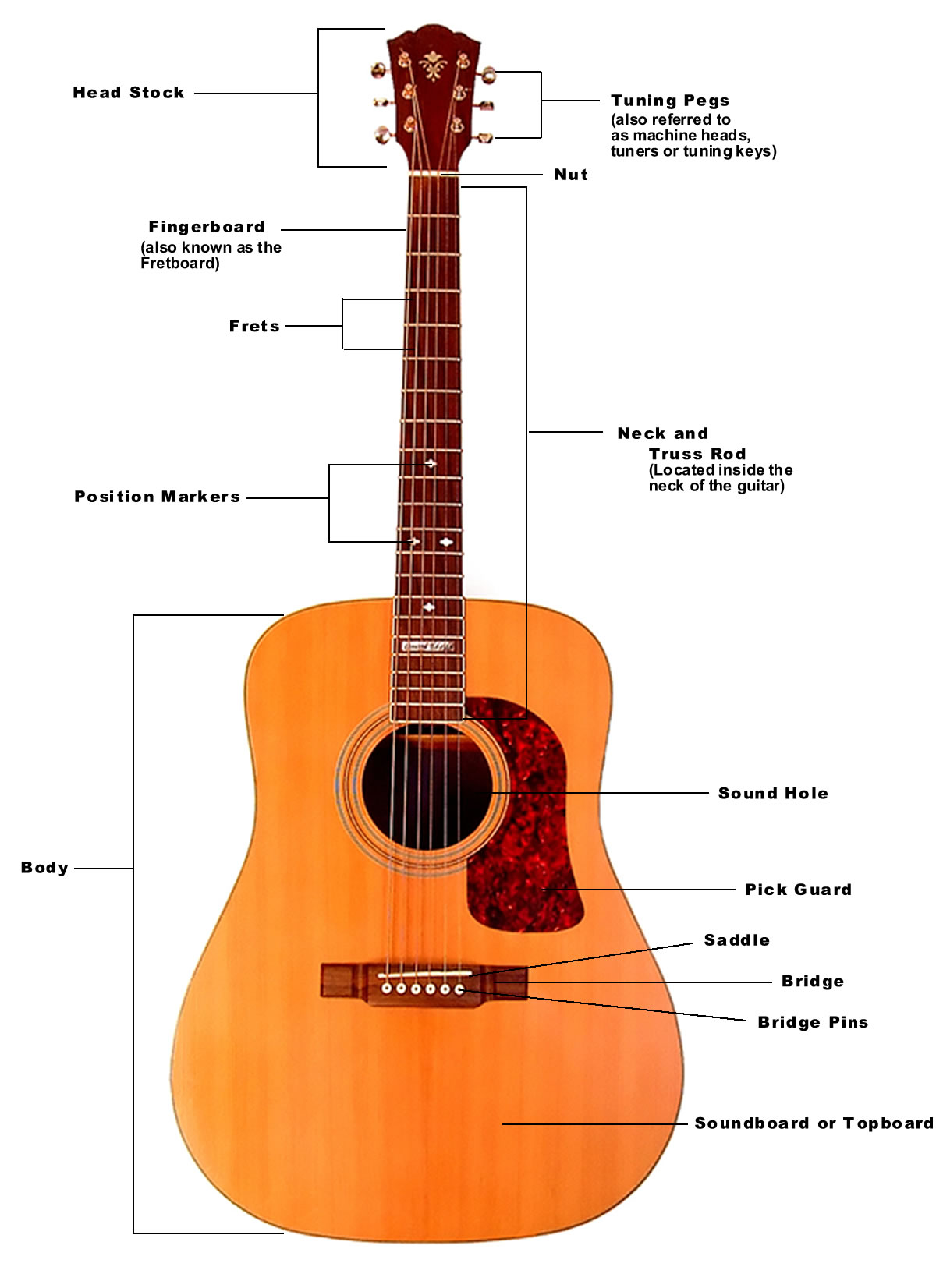
Below is a diagram of the acoustic guitar and its parts.

Click the image below for a larger version.
Parts of the Acoustic Guitar

The Headstock & Tuning Pegs

The Headstock is the very top portion of your acoustic guitar and holds the “Tuning Pegs ” (also known as machine heads, tuners or tuning keys). The Tuning Pegs can be turned either to your right or left and they adjust the pitch of your strings.

Nut

This small strip is located between the Headstock and Neck of your guitar. It is usually made of plastic or bone, but is sometimes made of other materials like brass or stainless steel. It may be small but it is a very important part. The Nut has small slits in it where the strings rest and guides the strings from the Fretboard to the Tuning Pegs. If you look closely at your guitar, you will notice that the Nut is slightly raised above the Fretboard. This is for the purpose of keeping your strings raised above the Fretboard at a certain height.

Neck , Fretboard & Frets

As you can see from the diagram above, the Neck is the long narrow part of the guitar that connects the Headstock to the Body. It is here where you will find the Fretboard (also known as Fingerboard) and the Frets. The Fretboard is a long piece of wood that has thin metal strips attached to it known as “Frets”. The Frets are used to divide the Fretboard. The Frets are actually the spaces in between the metal bars and not the bars themselves. Each Fret represents a different “pitch” or “note ” when pressed down and played.

Position Marker

Position Markers are small markers on the Fretboard (usually circles) that can be found on specific Frets. They serve as a guide of sorts. They are found on the third, fifth, seventh, ninth, twelfth, fifteenth and seventeenth Frets.

Body

The Body is the large hollow part of the acoustic guitar where the Sound Hole, Bridge, Pick Guard and Soundboard are located. If you play from a seated position, the Body is the part that rests on your leg.

Sound Hole & Pick Guard

The Sound Hole, as the name suggests, is the large hole found in the body of the guitar. The Sound Hole is where the sound waves made by playing the strings exit the Body of the guitar. The Pick Guard is the dark and smooth piece that is located right next to the Sound Hole. As you strum your guitar, your hand will naturally travel downward against the Body and the Pick Guard is there to protect the Body from scratches.

Saddle & Bridge

The Bridge is a wooden plate that is located on the Body of the guitar and it anchors the strings to the Body. The Saddle is a small strip attached to the Bridge, usually made of plastic or bone. The purpose of the Saddle is to raise the strings up above the Body and Fretboard. The Bridge Pins secure the guitar strings into place on the bridge.

Truss Rod

The Truss Rod is usually a steel rod that is located inside the Neck of your guitar. The purpose of the Truss Rod is  to help stabilize and adjust the curvature of the Neck. The Truss Rod has a bolt at the end of it that is used for adjustments. The Truss Rod is a very important part of your guitar. Without it, the Neck of your guitar would likely warp over time. It is highly recommended that you do not try and adjust the Truss Rod on your own and hire a professional. If you are not sure what you are doing, you could do some serious damage.

Soundboard

The Soundboard is the piece of wood on the body of your guitar that is responsible for amplifying the sound.
source : http://www.learn-acoustic-guitar.com/parts-of-the-acoustic-guitar

basic guitar chord

Open chords (some call them folk chords) are usually the first thing a beginning guitar player learns.  This doesn't mean that these beginner guitar chords are very easy: learning to get those left hand fingers work together and producing a clean sound is hard work, but with regular practice you'll soon get the hang of it.
Open chords are called this way because they contain at least one open string (strings that you play without fingering them). These basic guitar chords are used a lot in music, especially on acoustic guitar. They also work on electric guitar, but opens strings sound better on an acoustic guitar in my opinion. Folk music, singer-songwriter music and country music use a lot of open chords.
The best way to learn how to play the basic guitar chords is by learning songs.  On the next page are some guitar song chords that are playable with only the basic chords you'll learn on this page.  There's also a free printable guitar chord chart sheet that you can keep as a reference.  
Here follows a list of basic guitar chords that every guitarist needs to know.  To make it easy for you to see the guitar chord fingering, I put the guitar chord pictures next to the charts. Finger the chords with the top of your fingers and look out you don't touch adjacent strings.
A little bit about guitar chord names:
  • chords are named according to letters going from A to G
  • an 'm' after a letter means that the chord is a minor chord
  • a '7' after the letter means that the chord is a dominant chord
  • a letter without 'm' or '7' means that the chord is a major chord

To find out what the difference is between major, minor and dominant you should read the guitar music theory tutorial. Here's the list of basic guitar chords:

Guitar chord chart of C Guitar chord picture of C           Guitar chord chart of C7 Guitar chord picture of C7


Guitar chord chart of D Guitar chord picture of D           Guitar chord chart of Dm Guitar chord picture of Dm

Guitar chord chart of D7 Guitar chord picture of D7


Guitar chord chart of E Guitar chord picture of E           Guitar chord chart of Em Guitar chord picture of Em

Guitar chord chart of E7 Guitar chord picture of E7


Guitar chord chart of F Guitar chord picture of F


The F chord is a bit of a special case: the top 2 notes are fretted with one finger (the index finger).
This is one of the hardest chords to play for the beginner, but you'll soon get the hang of it (if you practice enough).


Guitar chord chart of G Guitar chord picture of G           Guitar chord chart of G7 Guitar chord picture of G7


Guitar chord chart of A Guitar chord picture of A           Guitar chord chart of Am Guitar chord picture of Am

Guitar chord chart of A7 Guitar chord picture of A7


Guitar chord chart of B7


Guitar chord picture of B7                                     source : http://www.guitarchordsmagic.com/basic-guitar-chords/basic-guitar-chords.html

Tuesday, September 14, 2010

Awas Virus "Deadlock", Pesannya Positif tapi Hancurkan Komputer

KOMPAS.com — Pesannya terdengar positif dengan kata-kata yang membangkitkan patriotisme. Namun, jangan terbuai kata-kata manis yang dibawa sebuah virus komputer lokal baru bernama Deadlock. Simak pesan tersebut berikut ini. 

Bebaskan Negeri kami Indonesia dari Terorisme, Anarkis, dan KKN (Kolusi, Korupsi & Nepotisme) pada Kubu Pemerintahan Republik Indonesia (Sipil, TNI & Polisi) serta Tangkap, Berantas dan Penjarakan ? Tanpa Kecuali. Bersihkan Negeri kami dari Portitusi, Perjudian dan Kejahatan Sosial. Merdekakan diri kami dari Kemiskinan, Kesengsaraan dan Ketidakadilan! Bersama Partai Demokrat ? SBY & BOEDIONO, Bersama Membangun Indonesia Adil, Makmur & Sejahtera

Atas Nama Bangsa Indonesia
Pangeran DEADLOCK

I?m Everyone, but NoOne
I?m Everything, but NoThing
I?m Everywhere, but NoWhere


Jika komputer Anda tiba-tiba menampilkan sebuah gambar dengan pesan tersebut (lihat gambar), Anda disarankan untuk segera ambil tindakan. Pasalnya, komputer Anda sudah diserang virus yang aktif dan mematikan.

Virus tersebut akan menampilkan pesan tersebut dalam desktop yang telah diambil alih. Biasanya pesan ini hanya akan muncul pada waktu yang ditentukan. Seiring dengan munculnya pesan ini, maka semua file yang ada di semua drive akan dihapus, termasuk program dan file system Windows.

Jadi, kalau Anda melihat pesan ini pada komputer Anda, kemungkinan sudah terlambat karena sebentar lagi data di komputer Anda akan dihancurkan. Seperti peribahasa "air tenang menghanyutkan", rupanya di dalam bisunya virus ini menyimpan bom waktu di komputer korbannya yang akan diaktifkan sesuai dengan waktu yang telah ditentukan.

Puncaknya, pada tanggal 12 dan 13 nanti, Deadlock akan membuat komputer Anda benar-benar deadlock alias dihancurkan semua datanya, baik data di seluruh harddisk, flashdisk, maupun file-file Windows sehingga menampilkan pesan "NTLDR is Missing".

Kenali cirinya

Virus ini sebenarnya masih masuk ke dalam keluarga Visual Basic yang dikompresi dengan menggunakan program Petite 2.x dengan ukuran sekitar 80 KB. Ikon yang digunakan juga tidak disamarkan, tetap menggunakan ikon aplikasi dan kemungkinan berasal dari salah satu kota di Kalimantan (Samarinda).

Jika virus ini aktif di komputer, ia akan membuat beberapa file yang akan dijalankan pada saat komputer dinyalakan.
- C:-Windows-system32-apache.exe
- C:-Windows-system32-mysql.exe


Pemilihan nama apache dan mysql kemungkinan bertujuan menyamarkan dirinya sebagai program populer Apache dan Mysql. Agar file tersebut dapat aktif secara otomatis pada saat komputer dinyalakan, ia akan membuat beberapa string pada registry berikut:
-HKEY_LOCAL_MACHINE-SOFTWARE-Microsoft-Windows-CurrentVersion-Run
-mysql = C:-Windows-system32-mysql.exe
-HKEY_CURRENT_USER-SOFTWARE-Microsoft-Windows-CurrentVersion-Run
-apache = C:-Windows-system32-apache.exe


Virus ini cukup cerdik dalam mengelabui pengguna. Pengguna tidak akan curiga jika sebenarnya komputer tersebut telah terinfeksi karena tidak ada tanda-tanda yang biasa dilakukan oleh virus lokal lainnya, seperti disable Task Manager / MSConfig / Regedit atau Folder Options, selain itu file yang dibuat juga tidak mencurigakan karena seolah-olah merupakan program Apache dan MySql. Pengguna baru sadar bahwa komputer telah terinfeksi virus pada saat terlambat, yang kala itu akan muncul pesan dari pembuat virus yang kemudian diikuti dengan munculnya pesan "error Windows file Protection". Hal ini menandakan bahwa ada suatu program yang berusaha untuk menghapus file system Windows.

Virus ini akan aktif secara otomatis setiap kali pengguna mengakses suatu drive/flash disk dengan memanfaatkan autorun Windows dengan membuat 3 buah file, yakni:
-[Desktop.ini] yang berisi script untuk menjalankan file [folder.htt]
-[Folder.htt], berisi script untuk menjalankan file utama yakni [flashguard.exe]
-[Flashguard.exe] merupakan file induk yang akan di jalankan.
Flashdisk merupakan salah satu media yang paling banyak digunakan oleh pengguna. Hal inilah yang akan dimanfaatkan oleh sebagian bahkan boleh dibilang semua virus untuk menyebarkan dirinya. Hal ini juga akan dilakukan oleh virus Deadlock dengan cara membuat beberapa file berikut.
-Desktop.ini
-Folder.htt
-Flashguard.exe


Bom waktu

Virus Deadlock laksana bom waktu yang akan menghancurkan komputer target pada waktu yang telah ditentukan. Virus ini akan menjalankan aksinya setiap tanggal 12-13 sekitar pukul 08.00-09.00 setiap bulan dengan cara MENGHAPUS SEMUA FILE/DATA TERMASUK FILE SYSTEM WINDOWS yang ada di semua drive termasuk di media flashdisk dengan menggunakan perintah cmd.exe /c del /f /s /q /a dan cmd.exe /c rd /s /q sehingga, jika komputer tersebut di-restart, maka akan muncul pesan "error".

Jadi, cara terbaik untuk mengantisipasinya, jangan lupa melakukan back-up data. Untuk mencegah terinfeksi virus ini, Anda disarankan menggunakan program antivirus yang dapat mendeteksi virus ini dengan baik.

Menurut pengetesan Lab Vaksincom, saat ini virus yang terdeteksi oleh Norman sebagai Deadlock belum terdeteksi oleh mayoritas antivirus yang ada di Indonesia, baik antivirus lokal maupun antivirus mancanegara. Norman Endpoint Protection mendeteksi virus Deadlock sebagai Tibs.DKKR.

Jika Anda menginginkan data Anda yang menjadi korban Deadlock ini kembali, jangan sekali-kali menginstal ulang OS Anda ke harddisk yang mengandung data Anda yang hilang tersebut. Lakukan proses recovery data penting dengan menggunakan aplikasi data recovery dan metode yang benar.

Jika Anda menginstal ulang OS Anda ke harddisk yang mengandung data yang ingin Anda selamatkan, kemungkinan keberhasilan recovery akan sangat rendah. Jika Anda tidak berpengalaman pada data recovery dan ingin mendapatkan bantuan data recovery profesional dengan harga yang reasonable, silakan hubungi divisi Data Recovery Vaksincom di e-mail info[at]vaksin.com.

trojan botnet mengintai pengguna facebook

Anda pengguna Facebook? Berhati-hatilah bila Anda menerima e-mail tipuan yang menyamar atas nama Facebook. Rabu lalu (28/10/09) para peneliti telah mengingatkan untuk waspada bagi pengguna web jejaring sosial seperti Facebook dimana mencoba mencuri password Facebook dan akun lainnya dan secara langsung mengunduh Trojan untuk mencuri data-data penting yang ada termasuk data finansial Anda.
Hati-hati dengan e-mail yang masuk ke inbox Anda. E-mail ini mengarahkan Anda untuk login ke halaman Facebook tiruan dengan motif yang mengatakan Anda diharuskan mengupdate facebook Anda dan meminta Anda untuk login ke sistem tersebut, kata Fred Touchette, salah satu analis sekuritas senior berbicara pada AppRiver.
botnet-facebook1
Halaman tipuan ini menawarkan ‘update tool’ yang mana merupakan sumber Trojan Zeus yang didesain khusus untuk mencuri data pribadi dan finansial dari pengguna Facebook, kata Touchette. Pengguna Facebook yang menginstall aplikasi Facebook di ponsel, juga sangat rentan dengan serangan phising melalui e-mail ini diana pada ponsel ditunjukkan notifikasi dari Facebook berikut ikon yang digunakan juga sama. Ini lebih susah dideteksi.
AppRiver sendiri telah memfilter lebih dari 6 juta e-mail yang mana merupakan notifikasi yang membawa nama Facebook. Sangat banyak sekali ditemui e-mail yang mengandung botnet di dalam e-mail yang difilter tersebut, kata beliau.
botnet-facebook2
Botnet yang disebutkan di sini memang berbeda yaitu Bredolab, e-mail ini merupakan e-mail tipuan yang membawa embel-embel “Facebook Password Reset Confirmation” yang di dalamnya sudah ada trojan-nya. Pada Rabu lalu, disebutkan hampir 730.000 e-mail sudah mengandung Bredolab yang dimaksud.
Untuk melindungi diri dari serangan phising ini, pengguna Facebook diharapkan berhati-hati bila mengklik link yang ada di e-mail dan harus benar-benar memperhatikan e-mail tersebut mengarah ke mana apakah ke halaman website Facebook atau justru halaman phising. Tentunya pihak Facebook sendiri tak memerlukan aksi pengguna menggunakan e-mail untuk mengupdate Facebook-nya, cukup langsung dari servernya langsung.
Nah, jika Anda mendapatkan e-mail yang dimaksud, jangan langsung mengklik link ataupun tombol apapun pada isi e-mail. Adalah lebih baik bila Anda mengecek langsung ke halaman Facebook Anda.

google goggles menerjemahkan bahasa asing lewat foto

Google Goggles adalah sebuah aplikasi baru yang bisa digunakan di ponsel dengan sistem Android.
Aplikasi Goggles ini bahkan bisa melakukan pencarian (Google Search) berdasarkan gambar dan bukan kata, misalnya saat itu anda sedang jalan-jalan ke San Fransisco dan melihat jembatan Golden Gate dimana pada saat itu anda lupa namanya, cukup dengan mengambil foto jembatan tersebut dan klik “cari”, maka Google Search akan secara otomatis mencari berdasarkan gambar atau foto yang ada.
Dan kali ini Google juga telah mengembangkan teknologinya itu. Aplikasi Goggles tidak hanya bisa digunakan untuk mengidentifikasi gambar atau foto sebuah gedung (landmark) tetapi juga mampu menerjemahkan bahasa Asing. Aplikasi ini bekerja dengan memakai teknologi mesin penerjemah milik Google serta kemampuan pengenal foto.
Jadi, jika saat itu pengguna menemukan teks berbahasa asing, ia tinggal membidikkan kamera ponsel ke teks tersebut. Hanya dalam hitungan detik, Google Goggles akan menerjemahkannya dari hasil jepretan tadi.
Prototipe ini mengkoneksikan kamera ponsel dengan optical character recognition (OCR) untuk menerjemahkan foto ke dalam teks terjemahan dalam 52 bahasa yang didukung Google Translate,” jelas Google. Namun sayangnya, untuk saat ini, aplikasi tersebut baru menyediakan terjemahan Jerman-Inggris.
So.. kita berharap saja semoga penerjemah bahasa Indonesia segera tersedia di aplikasi tersebut, jadinya akan makin memudahkan kita saat membaca buku-buku bahasa asing. Mereka untung, bangsa kita juga jadi makin pintar :D 

BootDVD Windows 7 Ultimate x64×32 With Update Was published on November 11, 2009

System Windows 7 is convenient, productive and exciting. Improved ways of searching and managing files, such as lists of transitions and more vivid view on the taskbar, help to perform the usual tasks easier and faster. Windows 7 provides improved performance and reliability, so your computer will work as you need. With support for 64-bit versions can take full advantage of the latest models of powerful computersand efficient components, such as the home team, Windows Media Center and Windows Touch, will provide new opportunities for controlling the computer and files.

Year: 2009
Version: 7600
Platform: Windows
System requirements:
* 64-bit (x64) processor with 1 GHz.
* 1 GB of RAM.
* Support for DirectX 9 with the driver WDDM, at least 128 MB of graphics memory, Pixel Shader 2.0 in color and 32 bits / pixel.
* Hard disk capacity of 40 GB to 16 GB of free disk space.
* A DVD-ROM drive.
* Audio output capability.
* Access to the Internet.
Language: English + Russian
Tabletka: Activator
Includes updated on 22.10.09. Nothing extra is not cut and not removed
Before:
Norton 360 3.5.2.11
Norton Internet Security 2010 17.0.0.136
Norton Utilitie 2010 v14.5.0.116
TuneUp Utilities 2010
Auslogics BoostSpeed 4.5.14.270
Ashapoo WinOptimizer 6.50
WinTools.Net Ultimate Edition 9.10.1
Your Unistaller! PRO 6.3.2009.11
Driver Genius Professional 9.0.0.182
HDD Regenerator v1.71
Everest Ultimate Edition 5.30.1900
Nero 9.4.26.0 Lite
BurnAware Professional v2.4
UltraISO Premium Edition v9.3.5.2716
WinRAR 3.90.Final Rus
CyberLink PowerDVD Ultra 9.0.2227
Cowon JetAudio v7.5.4 Plus
KMPlayer 2.9.4.1435
Tags : cowon jetaudio,  Norton,  norton internet security,  Windows, 

google me ,,situs jejaring social yang akan bersaing dengan facebook

Google Me merupakan suatu proyek dari Google untuk membuat suatu situs social network baru yang direncanakan mampu menyaingi bahkan mengalahkan Facebook. Memang saat ini Facebook bisa menjadi ancaman baru yang kuat karena jumlah visitor dan  lamanya pengunjung dalam menggunakan Facebook yang lama-lama menjadikan Google kuatir. Sebelumnya Google sudah menambahkan fitur social network yang terintegrasi dengan Gmail yaitu Google Buzz tapi dirasakan kurang berhasil dan Orkut situs social network yang dibeli Google  tidak bisa meluaskan jaringannya ke seluruh dunia dan hanya laku di negara tertentu saja. Selain itu ada juga proyek Google Wave yang juga belum berhasil mengalahkan Facebook.

Ada dua sumber yang menjadi pemicu berita Google Me ini yaitu dari Kevin Rose si pemilik Digg.com yang mentweet bahwa dia mendapatkan info dari sumber terpercaya bahwa Google sedang membangun proyek Google Me dan juga yang terbaru dari Adam D’Angelo mantan CTO ( pemimpin bagian teknologi) Facebook dan sekarang menjadi pendiri Quora yaitu layanan question and answer yang terintegrasi dengan Facebook.
Adam D’Angelo menjawab pertanyaan “Apakah ‘Google Me’ suatu rumor?” dan ternyata dia juga menjawab bahwa hal itu bukan rumor dan merupakan proyek yang real bahkan menjadi proyek yang memiliki prioritas tinggi dan melibatkan banyak orang Google.
Saat ini Google Me belum diluncurkan ke publik dan masih menjadi proyek internal Google. Jadi kapan Google Me diluncurkan belum diketahui, dan apakah benar Google Me akan menjadi Facebook killer? Kita tunggu saja kiprahnya..]
source : http://www.beritateknologi.com/google-me-situs-social-network-baru-untuk-menantang-facebook/

facebook question fasilitas facebook terbaru untuk tanya jawab

Anda pernah mengunjungi answers.yahoo.com? answers.com? atau yang baru muncul adalah Quora. Semua situs tersebut memang terkenal dengan fitur tanya jawabnya yang laris, dan ada juga stackoverflow yang sangat terkenal di kalangan programmer. Fitur tanya jawab ini memang menarik sehingga Facebook pun tak ketinggalan dengan menambahkan fasilitas ini sebagai fitur utama di dalam Facebook, yang selevel dengan layanan Photos maupun Links.

Anda bisa menyertakan foto di pertanyaan, menambahkan tag, mengikuti suatu pertanyaan, menambahkan polling di Facebook Questions ini.

Saat ini Facebook Questions sudah dirilis untuk sebagian orang sebagai tester versi beta saja pada hari ini. Jadi sabar menunggu dulu sampai Facebook meluncurkan fasilitas ini untuk umum yah.
(sumber)
Related Posts with Thumbnails

Monday, September 13, 2010

Lubuntu 10.04 is now available for download

Julien Lavergne released the final "stable beta" version of lubuntu 10.04.
- Torrent : http://people.ubuntu.com/~gilir/lubuntu-10.04.iso.torrent
- Direct download : http://people.ubuntu.com/~gilir/lubuntu-10.04.iso
- MD5Sum: http://people.ubuntu.com/~gilir/md5sum.txt
== What is Lubuntu ? ==
Lubuntu is a Ubuntu variant using the LXDE desktop. It's designed to be a lightweight and easy-to-use desktop environment. Lubuntu is currently not part of the Ubuntu family, and not build with the current Ubuntu infrastructure. This release is considered as a « stable beta », a result that could be a final and stable release if it was included in the Ubuntu family. Please note also that Lubuntu 10.04 is not a LTS version. For the future we aim to include all packages of lubuntu in the Ubuntu repository.
== Features ==
- Based on the lightweight LXDE desktop environment.
- Pcmanfm 0.9.5, the rewrite of pcmanfm using gio/gvfs.
- Lxdm, a new and lightweight GTK display manager.
- Chromium, the open-source version of Google Chrome.
- ... and, of course, based on Ubuntu 10.04

See the complete list of applications on https://wiki.ubuntu.com/Lubuntu/Applications
The release notes are available on https://wiki.ubuntu.com/Lubuntu/ReleaseNotes/LucidLynx
== Specific Lubuntu changes ==
Lubuntu still contains modifications not available in the official repository, you can see them in the Lubuntu PPA [1] :
- New pcmanfm2 and libfm (LP: #523433)
- lubuntu-default-settings with pcmanfm2 support
- Fix for blurry shutdown-icon from elementary-icons (LP: #527345)
- Autologin support in ubiquity (LP: #546445)

== Thanks of Julien ==
I would like to thank all people involved in the development of Lubuntu during this past 6 months :

Thanks to the LXDE team for providing this nice desktop environment.

Thanks to Rafael for his wonderful work on the artwork.

Thanks to Mario for his wonderful work on the website, the wiki and all the advertising.

Thanks to all testers which help in the testing process, and make Lubuntu better.

Thanks to all people which help to provide support and documentation to new Lubuntu users.

It was a pleasure to work with you.

This release is not an end, but just the beginning. More will happen in the next releases :-)
== Links ==
Website: http://lubuntu.net
Documentation: https://wiki.ubuntu.com/Lubuntu
LXDE website: http://lxde.org/

[1] : https://launchpad.net/~lubuntu-desktop/+archive/ppa
sources : http://lubuntu.net/blog/lubuntu-1004-now-available-download

Wednesday, September 8, 2010

free ringtone,dewa,dream theater,andra,arwana,slank,padi

oke bagi kamu baladewa aku ada ringtone nya nie,,ada lagu risalah hati,persembahan dari surga,kosong,dan juga beberapa lagu lain seperti dream theater,pull me under,stream of consious,dan andra, sempurna,
jagan lupa komntar nya ya,kalo bisa follow my blog,,and i will follw u 2.oh ya ada juga arwana dengan judul kunanti ,slank alon alon,padi terbakar cemburu .
ukurannya kecil aja kok 
silahkan didownload disini ya :
judul : risalah hati
artis :dewa
link download : http://www.4shared.com/audio/--3VcdcR/risalahhati.html


judul : persembahan dari surga
artis :dewa
link download : http://www.4shared.com/audio/VJU8Rmvf/persembahandarisurga.html

judul : kosong
artis :dewa
link download :http://www.4shared.com/audio/HCJkATir/kosong_nada.html

judul : stream of consiouness
artis :dream theater
link download :http://www.4shared.com/audio/LLP2YUdN/streamofconsious.html
                       http://www.4shared.com/audio/MyfLVvFw/_2__streamofconsious.html

judul : pull me under
artis :dream theater
link download : http://www.4shared.com/audio/9AWnFGzc/pullmeunder.html

judul : sempurna
artis :andra and the backbone
link download :http://www.4shared.com/audio/qHtnBzzr/andra_sempurna.html


judul : risalah  hati
artis :dewa
link download : http://www.4shared.com/audio/--3VcdcR/risalahhati.html 


judul : alon alon asal klakon
arti s:slank 
link download : http://www.4shared.com/audio/2pm1Mxd0/alonalon.html

judul : kasidah cinta 
artis :dewa
link download :http://www.4shared.com/audio/xLwtm6QD/kasidah_cinta.html

judul : terbakar cemburu 
artis :  padi 
link download :http://www.4shared.com/audio/x7xsxQAG/terbakarcemburu.html


judul : kunanti 
artis :arwana 
link download :http://www.4shared.com/audio/QQmiJhyZ/kunanti.html

oke oke ,,moga aja makin menambah hot sms atau telp yang masuk ya
jangan lupa komentar nya yaaaaaaaaaaaaaaaaaaaa


tungggu selanjutnya


selamat hari raya idul fitri ya
sambut hari penuh kemenangan setelah hari perjuangan 
^_^


Tuesday, September 7, 2010

Facebook Bikin Antivirus Gratis Bareng McAfee

Facebook, situs jejaring social no.1 di dunia yang sempat menjadi target serangan cyber di tahun lalu, kini berniat memberikan software gratis dari McAfee Inc untuk melindungi user. Facebook mengungkapkan, Selasa (12/01) kemarin bahwa 350 juta membernya dapat men-download software gratis tersebut untuk trial 6 bulan dari McAfee Internet Security Suite, yang dapat melindungi user dari virus dan ancaman Internet lainnya.
Seperti yang diketahui, Facebook dan McAfee yang menjadi vendor pencipta software keamanan terbesar kedua di dunia, telah bekerja sama untuk membuat tool terpisah yang dapat men-scan dan membersihkan komputer pengguna Facebook yang diketahui telah mengalami serangan online. Facebook menjelaskan bahwa tool scanning tersebut ditawarkan ke user tanpa biaya, dan tidak memungut pendapatan dari McAfee jika pengguna Facebook membeli software McAfee Internet Security Suite setelah trial 6 bulan.
Tool scanning McAfee Internet Security Suite (home.mcafee.com/Store/Downloads.aspx ) tersebut akan segera hadir dalam versi bahasa Inggris untuk pengguna Facebook di US, Inggris, Perancis, dan 8 negara lainnya, juga negara lainnya di waktu 3 bulan tahun ini.(h_n)

Asyik, Bisa Simpan Isi Harddisk di Google Docs 7GB

Google kini telah menawarkan hardisk virtual kecil di cloud sehingga user dapat mengakses semua file darimana saja. Google Docs juga dapat menerima upload dari berbagai macam file, tidak hanya text dan spreadsheet. Pergerakan Google ini sekaligus memperketat persaingan dengan Microsoft dan dapat mengalahkan Apple dengan adanya backup dan penyimpanan di remote server.
Bisnis penyimpanan cloud atau di Internet yang dipadu dengan koneksi broadband ini membuat semua file dapat diakses seperti ketika mengakses file di harddisk atau netbook. Cloud computing juga memberikan kemungkinan kecil akan hilangnya data ketika user kehilangan laptop, misalnya.
Ketika email dengan file besar menjadi sulit, maka user dapat meng-upload ke Google Docs hingga 250MB. Google Docs juga memudahkan user untuk backup lebih banyak file secara online, dari gambar yang besar hingga rangkaian foto ke smartphone. Untuk itu, Gmail memberikan penyimpanan sebesar 7GB untuk email dan attachment, sementara untuk Google Picasa dapat menyimpan foto hingga 10GB. Untuk pembayaran 1GB sebesar $0.25 per GB per tahun. Mungkin ini akan menjadi Google Drive, harddisk kapasitas besar di Internet.(h_n)

 
Design by Free WordPress Themes | Bloggerized by Lasantha - Premium Blogger Themes | Laundry Detergent Coupons